


Since the pandemic Quick Response (QR) codes have become ubiquitous. Gone are the days where directing people to a website involved someone having to say out loud “double-u, double-u, double-u dot” followed by dashes, slashes, colons and underscores only to find the incomprehensible mess made everyone’s browser have a meltdown. Now you just point your smartphone camera at a weird looking design and hey presto you are where you want to be. Easy peasy. But, should it be this hassle-free? What’s the catch? There’s always a catch and it’s not in just QR codes, it’s in everything we use; the battle between convenience versus security is constant.
QR codes have been around since the mid 90s. They were invented by Japanese company Denso Wave working for Toyota, to improve the efficiency of tracking automotive parts during manufacturing. Before that, most tracking relied on barcodes which were created in the 50s and were very limited. They could only be read in one dimension (horizontal) and hold just 25 characters. QR codes in comparison, are seriously impressive. They can be read in 2D (horizontally and vertically) and contain up to 4,296 alphanumeric characters or 181 Chinese or Kanji symbols, using white ‘0’ and black ‘1’ squares. They can be scanned at any angle and still work even if 30% of the code has been destroyed or is obscured. I can see why they are so popular, they’re a brilliant way to communicate long complex strands of information instantly. They are also a scammers dream come true.
Say I want to hustle you but I need you to navigate to a dodgy website like www.iamstealingyourmoney.com (I had to actually check that wasn’t a real domain), the moment you see that name you won’t click on it but if it’s in a QR code, hardly anyone ever checks where they are being sent to and that’s the problem.
There has been a 700% increase in QR related scams in the past four years and sadly, things are getting worse. There are three main scams involving the codes:
Firstly, a scan that takes you to a cloned website that looks like the real thing and prompts you to enter your payment or login details. Cloning legitimate websites has become child’s play for most scammers now. The website will look identical and everything you type on it will be sent to the bad guys. This would be a straightforward phishing scam or as the kids say now ‘quishing’ as it’s using a QR code - sorry I don’t make these names up, blame the security community. Essentially the scammers are after sensitive personal info they can either sell or use to further scam you.

Second, QR codes can be used to prompt you into downloading apps. A recent story involved a man downloading a parking app which then started charging him £60 as a subscription he never agreed to. Scammers have become very good at designing innocuous looking and sounding apps that are designed to steal your bank details. In 2024, letters sent from the official Swiss Federal Office of Meteorology and Climatology (MeteoSwiss) urged recipients to scan a printed QR and install a new “severe weather app” called AlertSwiss. Only, the letters were not from the real MeteoSwiss and the app, which was similar sounding to the official app, Alertswiss (yep, just that one lower case letter difference), was a sophisticated banking Trojan designed to look like a weather app but steal financial info.
Finally, and more alarmingly, there have been several cases where just scanning the code and then clicking one more button on the destination website has seen unauthorised malware downloaded onto people’s phones. This is sometimes referred to as ‘sideloading’, when apps bypass the Google or Apple Store.
To be clear, QR codes do not carry malware themselves - they are just an address, scanning one is unlikely to do you any damage; it’s what happens after the scan which can be dangerous.
Ultimately, QR codes are a great example of risk-reward choices we have to make all the time. Yes, they are easy to use but they are riddled with vulnerabilities. You should only really scan one if you are absolutely certain it comes from a legitimate source.
Never scan QR codes you see on posters or street furniture like lamp posts or parking meters.
Be careful clicking on anything or sharing any info on a website you’ve arrived at via a QR code.
Never download apps via QR codes that you are not sure about.
This is the ongoing battle between innovation and safety. Convenience versus security. Take pacemakers, small devices implanted in a patient’s chest that uses electrical pulses to regulate the heartbeat, the first implants started in the late 1950s and while they saved millions of lives, if the hardware had to be adjusted, the patient had to go through a major operation to make those changes.

In the mid-1970s though, pacemakers became non-invasively programmable using radio a frequency telemetry link. Great news right? Patients no longer have to suffer surgery to adjust these life saving machines. But, along with that convenience came the vulnerability. In 2008, researchers at the University of Massachusetts Amherst and University of Washington demonstrated a ‘software-defined-radio attack against an implantable defibrillator/pacemaker (introduced to the US market in 2003)’. They could take control of the pacemaker administering unnecessary shocks or drain its battery. It sounds like fiction but the dangers were real enough that even earlier, in 2007, Vice President Dick Cheney’s heart defibrillator was modified so it couldn’t be hacked by terrorists who might try to kill him.
Now, I am not for a moment suggesting that pacemakers are a 'convenience'. That would be absurd. Millions of people rely on these implants, which have undoubtedly saved countless lives. However, their development tells us a lot about the order in which we do things: innovation often runs ahead before the risks have even been considered. In this case, something designed to save patients having needless surgeries and ease the burden on doctors ended up opening the door to serious risk. Fortunately, thanks to work carried out by ethical hackers and security experts, who poke and prod anything they can get their hands on, vulnerabilities are constantly monitored and fixed with software patches and updates, meaning the benefits far outweigh the risks.
However, we don’t have to go as far as pacemakers to see the same conflict repeating itself. Look at the way you pay for things when out and about using cards. You used to have to swipe the card and sign, then we moved to chip and PIN (Personal Identification Number) and now we simply touch our cards or phones on the terminal. All progressions are focused on making things easier for the consumer. Innovation running ahead while security experts start poking around. All the steps had their own issues, mag-stripes were easily cloned - on The Real Hustle we cloned cards and then programmed mobile top up cards to use at ATMs. Chip and PIN machines were hacked and contactless gave away serious personal data. Don’t get me wrong, I am not against progress and to be fair payments using phones with Apple Pay and Google Wallet are very secure but it seems that we always go about things the wrong way round. We put convenience out there before the security community have had a chance to figure out what can go wrong.
The problem is most people don’t have the time or the expertise to understand the vulnerabilities in what they use. Most of us don’t really know what security issues can compromise our phones, our cars, laptops, banking apps or email clients. If we did, we would take the necessary steps to protect ourselves. After all, you lock your front door because you are aware of burglars.

In 1894, at the height of his fame, magician John Nevil Maskelyne wrote a book called Sharps and Flats. It’s a book about the methods cheaters (Sharps) used against their victims (Flats) in games of skill and chance but in essence it was one of the very early consumer protection books and this paragraph in the introduction I think rings true to this day:
"Experience has demonstrated that the ignorance of the public with regard to the capabilities of trickery is the principal factor in all problems connected with every kind of deception. If the public only knew a little more in this respect, the thousand-and-one quackeries which flourish in our midst could not exist. My self-imposed task, then, has ever been to endeavour to educate the public, just a little, and to enlighten those who really seek for truth amid the noxious and perennial weeds of humbug and pretence."
John Nevil Maskelyne ‘Sharps and Flats”
So, which is more important to you? Security or convenience?
If you opted for security (and please God I hope you did), it will come with some inconvenience but more peace of mind which I think is an acceptable trade off.
Below are some examples of things you can start doing today to minimise your chances of being scammed:
Never use the ‘Keep me logged in’ option when checking emails, social media or shopping on your browser. This can protect you from ‘session hijacking’ where criminals can steal the site cookie and have access to your emails or site services until you sign out.
Use different and secure passwords for every account so that one data breach doesn’t become access to all your accounts. Yes, that is more to remember but that’s what password managers are for.
Get rid of smart speakers or smart assistants on your phone to prevent possible eavesdropping and data harvesting. Come on, be honest, you don’t really need a smart speaker to play music, set a timer or tell you what the weather is outside.
Stop saving cards on websites for one-click checkout. Yes, you will have to enter your card details every time but if they get hacked your details are gone.
Avoid “Sign in with Google/Apple/Facebook”. Again, if these credentials are stolen they will give scammers access to a lot more besides the specific website.
Turn off the WiFi auto-connect on your phone to stop it re-connecting to networks it thinks are safe. Criminals set up ‘evil twin’ networks with the same name designed to steal your data.
Here’s one last example that I think illustrates the ‘convenience vs security’ issue brilliantly. Over the past few years push-button locks like the one below have become ubiquitous.
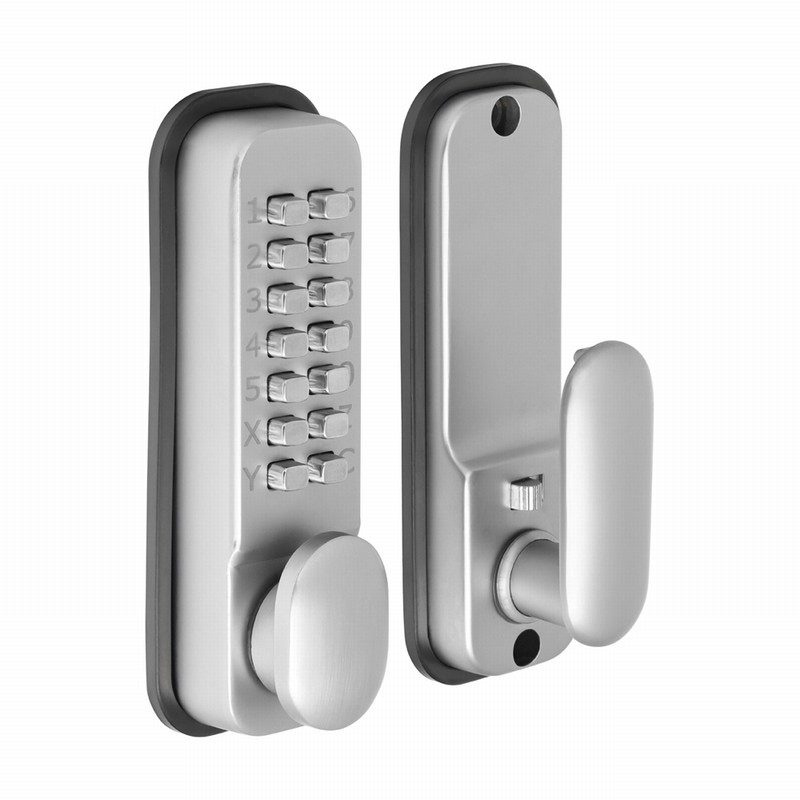
These locks are everywhere because they are a very useful piece of kit. Easy to install, no batteries or power needed, no fobs or cards to be issued. They are fully mechanical and the four to six digit code can be changed very easily. In one office I worked in, this type of lock was used to protect the IT room. I can see why they’re so popular, you just give the code out and if there is a change of staff you can change it in a matter of minutes, which is funny because you can also break into these locks in pretty much the same amount of time. All you need is a UV pen and a black light.
First you apply UV ink, which is invisible, to all the keys. Then you wait for the door to be used a few times.
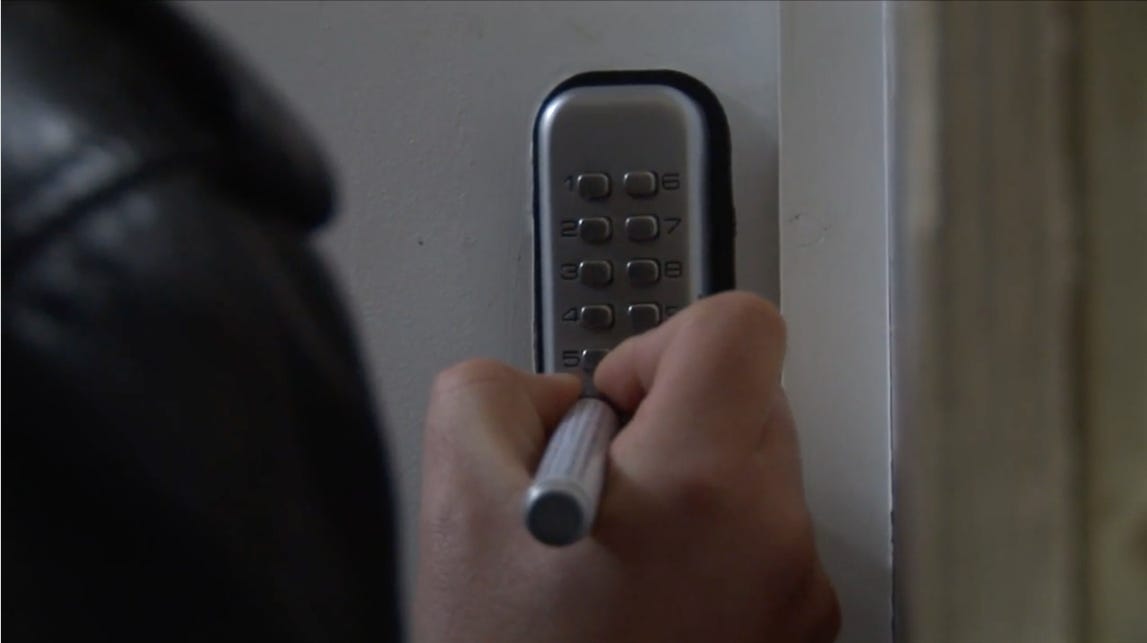
The ink will rub off as the buttons are pressed. Using the black light you can see which keys have been pressed. Simple really.
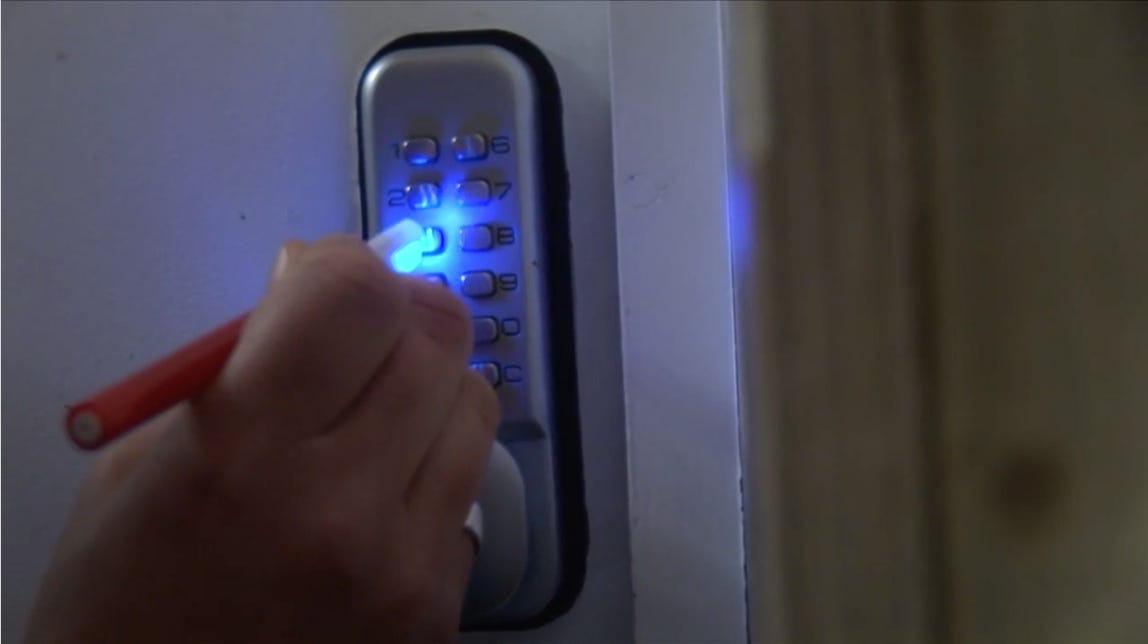
Now, I can hear some of you shouting ‘OK, smarty pants, you have the digits but you don’t have which order they’re in…’ and you’d be right, only here’s the issue with these locks, the order doesn’t matter. If the code is ‘1, 2, 3, 4’ any combination of those numbers will open the door. ‘4, 3, 2, 1’ will open the door. ‘1, 3, 2, 4’ will open the door. I know, I was gobsmacked when I first found out too.
Am I saying these locks are rubbish? Absolutely not. They are really useful for lots of places but knowing this information will help users make better choices on where to install them.
Look for the vulnerabilities - study them and make an informed choice of where and how you use the tech in your life. Nothing is 100% secure but taking some small steps to make things just a little harder for scammers might save you from a whole load of misery. QR codes are very useful but remember you cannot trust where they will take you and push-button locks are probably more suited to garden sheds than the IT room.